
Build an AI-Powered Personal Coaching App with ChatGPT and GuidedTrack
OpenAI’s ChatGPT is one of the most capable AI models available today. It handles nuanced instructions, follows system prompts reliably, and can generate thoughtful, personalized responses to almost anything a participant writes, making it a powerful addition to any GuidedTrack program.
This tutorial walks you through a concrete example: a participant describes a personal challenge they’re facing, and ChatGPT responds with three practical, compassionate suggestions tailored to what they wrote. But the underlying pattern is the same whether you want the AI to generate personalized quiz feedback, summarize a participant’s open-text responses, recommend next steps based on their answers, write a custom reflection based on their mood, or do almost anything else with language. Once you understand how to connect ChatGPT to a GuidedTrack program, you can adapt it to a huge range of applications.
What You’ll Need
- An OpenAI API key (from platform.openai.com)
- A GuidedTrack account with Custom Services enabled
Step 1. Generate an OpenAI API key
Log in to your OpenAI account, or sign up for a new one if you don’t have one yet. Once signed in, go to the OpenAI API and click “+ Create new secret key”. Copy the key and store it somewhere safe, it’s only shown once.
Step 2. Create and configure your GuidedTrack program
If you already have a GuidedTrack account, go here to login. If you don’t have a GuidedTrack account yet, go here to create one for free! Now, go to your programs page in GuidedTrack, and create a new GuidedTrack program and name it whatever you like.
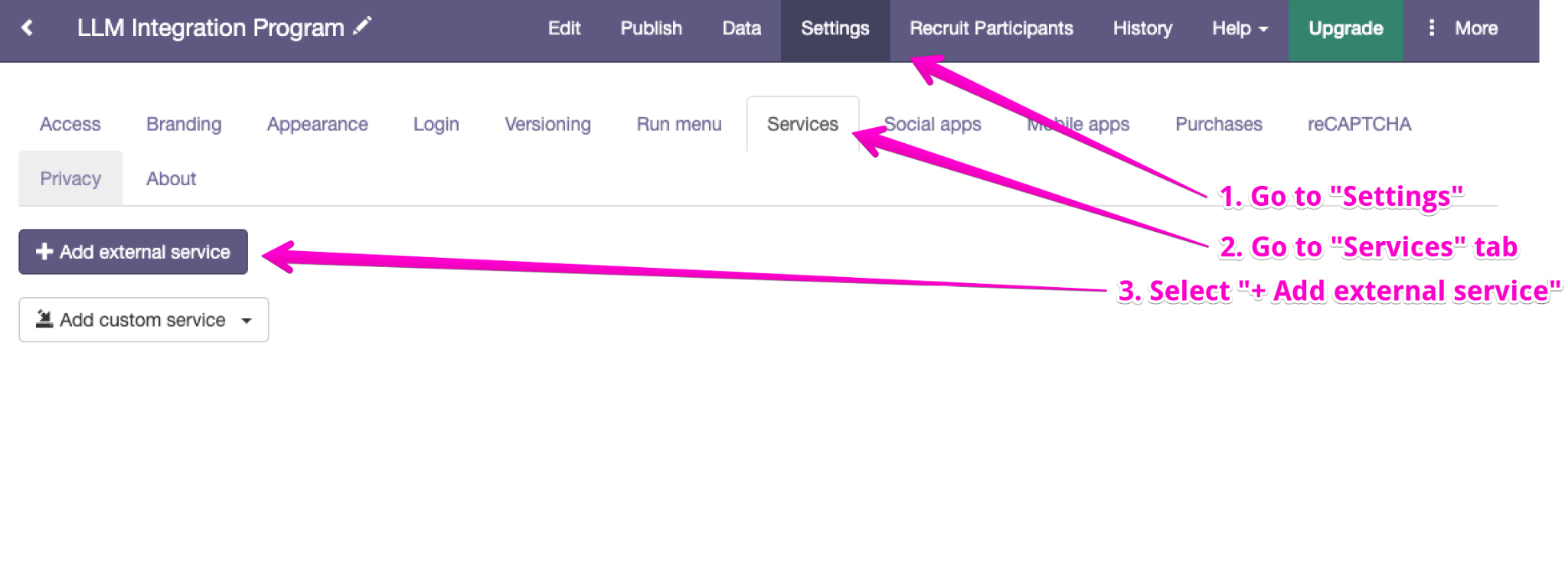
Select Settings on the navigation bar, go to the Services tab and click on “+ Add external service”:
Use these values to fill in these fields:
| Name | OpenAI API |
| URL | https://api.openai.com/v1 |
Add a header with the name Authorization and the value Bearer [your API key]. Click Save.

Step 3. Write your GuidedTrack program
Here’s a complete example, a short reflection tool that asks a participant to describe a challenge they’re facing and returns GPT-powered suggestions:
>> chatgpt_model = "gpt-6-luna"

*question: What's a challenge you're working through right now?
	*type: paragraph
	*save: challenge_text

>> prompt_for_chatgpt = "You are a supportive coach helping people navigate personal and professional challenges. Be warm, practical, and specific. The user is facing this challenge: '{challenge_text}'. Offer 3 practical, compassionate suggestions to help them move forward. Keep your response to 3 short paragraphs."

Please wait, processing your input...

*service: OpenAI API
	*path: /responses
	*method: POST
	*send: { "model" -> chatgpt_model , "input" -> prompt_for_chatgpt }
	*success
		>> raw_from_chatgpt = it["output"]
		>> content_from_chatgpt = raw_from_chatgpt[2]["content"]
		>> text_from_chatgpt = content_from_chatgpt[1]["text"]

	*error
		>> error_with_ai = 1
		>> full_error_message = it

*wait: data
*clear

*if: error_with_ai
	The AI had an error.

	Full response including error: {full_error_message}

	Please report this bug.

*if: not (error_with_ai)
	*Your challenge:*
	{challenge_text}

	*Here are some suggestions:*
	{text_from_chatgpt}
How the code works
The program runs in three stages.
Stage 1 – Collect input
The program initializes the chatgpt_model variable with the model to use and prompts the participant to describe a challenge they are currently working through. The participant’s response is saved in challenge_text. The program then constructs prompt_for_chatgpt, which combines the participant’s challenge with instructions for the AI to provide three practical and compassionate suggestions. While GuidedTrack processes the request, the participant sees “Please wait, processing your input…”
>> chatgpt_model = "gpt-6-luna"

*question: What's a challenge you're working through right now?
	*type: paragraph
	*save: challenge_text

>> prompt_for_chatgpt = "You are a supportive coach helping people navigate personal and professional challenges. Be warm, practical, and specific. The user is facing this challenge: '{challenge_text}'. Offer 3 practical, compassionate suggestions to help them move forward. Keep your response to 3 short paragraphs."

Please wait, processing your input...
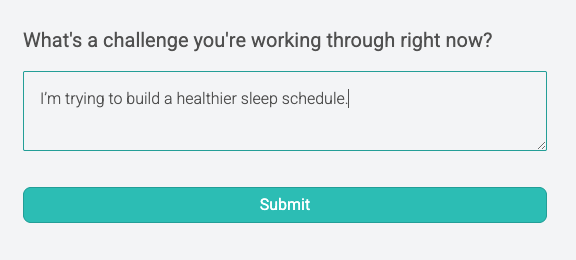
This is what the user will see:

Stage 2 – Call the API
The *service block sends the participant’s input to OpenAI’s Responses API. The request uses the chatgpt_model variable for the model and prompt_for_chatgpt for the input.
If the API call is successful, the response is parsed in three steps:
- The full output is stored in raw_from_chatgpt,
- the content is extracted from raw_from_chatgpt[1][“content”] and stored in content_from_chatgpt,
- and the generated text is then extracted from content_from_chatgpt[1][“text”] and stored in text_from_chatgpt.
If the API call fails, error_with_ai is set to 1, and the full error response is stored in full_error_message for further handling.
*service: OpenAI API
	*path: /responses
	*method: POST
	*send: { "model" -> chatgpt_model , "input" -> prompt_for_chatgpt }
	*success
		>> raw_from_chatgpt = it["output"]
		>> content_from_chatgpt = raw_from_chatgpt[2]["content"]
		>> text_from_chatgpt = content_from_chatgpt[1]["text"]

	*error
		>> error_with_ai = 1
		>> full_error_message = it
Stage 3 – Display the result
*wait: data ensures the API response and any updated variables are fully synced before the program continues. *clear removes the loading message. If an error occurred during the API call, the participant is shown an error message along with the full error response. Otherwise, the participant sees their challenge followed by the suggestions generated by the AI.
*wait: data
*clear

*if: error_with_ai
	The AI had an error.

	Full response including error: {full_error_message}

	Please report this bug.

*if: not (error_with_ai)
	*Your challenge:*
	{challenge_text}

	*Here are some suggestions:*
	{text_from_chatgpt}
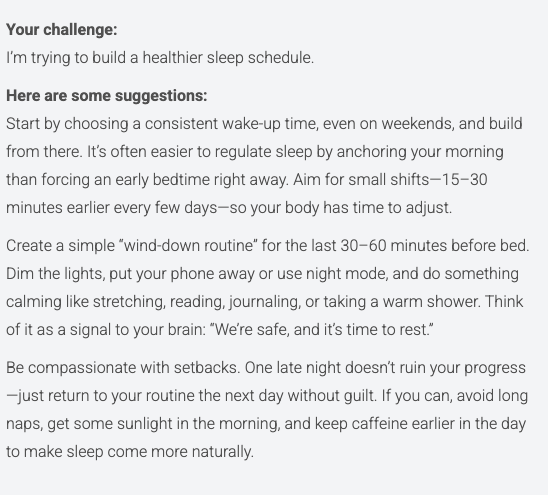
This is what the user will see:
Adapting This for Your Use Case
The same pattern works for any scenario where you want ChatGPT to respond to something a participant wrote:
- Assessment feedback: After scoring a quiz, send the score and a summary of responses to OpenAI and ask it to write personalized feedback.
- Open-text analysis: Ask participants to write a short reflection, then use ChatGPT to categorize or summarize what they wrote.
- Dynamic next steps: Based on what a participant selected or wrote, ask ChatGPT to recommend a personalized next action or resource.
- System prompt variations: Control the model’s tone, format, and constraints through the system prompt. Want bullet points, a specific reading level, or a particular persona? Put it there.
Also Read
Build an AI-Powered Learning App with Gemini and GuidedTrack
Build a Psychology Reflection Tool with Claude and GuidedTrack
Use GuidedTrack to Build a ChatGPT-Style Web App with the OpenAI API
The basic of using *service to embed other apps and tools

