
How to Build a Survey or Online Experiment with AI (Claude Code or Codex) Using GuidedTrack
GuidedTrack is a free survey and experiment builder, and its AI Coding Agent Skill lets Claude Code or OpenAI’s Codex build surveys, questionnaires, and online experiments from a plain-English description.
There’s now a much easier way to build studies with GuidedTrack. AI coding agents like Claude Code and OpenAI’s Codex can write GuidedTrack programs for you using the GuidedTrack AI Coding Agent Skill. The skill is a reference package that teaches the agent GuidedTrack’s exact syntax, so it doesn’t guess at keywords. Once it’s installed, you describe a tool, study, or survey in plain English. The agent writes the program, pushes it live to your GuidedTrack account, and pulls the resulting data back. You never have to write GuidedTrack code yourself, and you don’t need any coding experience.
You can use this to build almost anything GuidedTrack supports: simple surveys and questionnaires, customer and employee surveys, feedback forms, psychology experiments, randomized controlled trials, personality quizzes with results, calculators, interactive courses, and decision-making tools. GuidedTrack also handles what basic form builders can’t, like branching logic, skip logic, random assignment to conditions, and scoring. That makes this one of the fastest ways to build a complex survey or experiment with AI, whether you’re an academic researcher running behavioral science studies or someone who just needs a good survey, and whether you’re new to GuidedTrack or have used it for years.
Example: A Hiring Perceptions Vignette Experiment
This post walks through the process with a concrete example: a hiring perceptions vignette study. Participants see a resume alongside a candidate photo and rate how qualified the candidate seems. The resume text is the same for everyone. The photo varies across a 2×2 factorial, between-subjects design: the candidate is either a man or a woman, and is either wearing glasses or not. Each participant is randomly assigned to one of the four conditions. This is a classic behavioral science setup for studying how appearance shapes perceived competence.
We’ll use Claude Code here, but the same steps work with Codex and most other AI coding agents.
What You’ll Need
- Claude Code. This requires a paid Claude plan.
- A NEW GuidedTrack.com account. GuidedTrack’s free tier is enough to build and run this study. Keep this account separate from your personal account (see Step 1).
Already using Claude Code? Ask it to install the GuidedTrack AI Coding Agent Skill, then describe the program, survey, or study you want to build. You’ll still need a separate GuidedTrack account and a login file (Steps 1 and 6) before Claude Code can publish anything. If you’re new to Claude Code, follow the steps below from the beginning.
Step 1. Create a Dedicated (Free) GuidedTrack Account
Sign up for a new, free account at GuidedTrack.com with a fresh email address that you’ll use only with Claude Code. Don’t reuse your main account. In Step 6 you’ll store this account’s password in a plain-text file so Claude Code can publish programs for you. A separate account means that password gives access to as little as possible.
Step 2. Install Claude Code
If you are already using Claude Code, you can skip this step.
On Mac or Linux, open a terminal and run:
| curl -fsSL https://claude.ai/install.sh | bash |
For Windows or other install options, follow the official quickstart guide.
Step 3. Create a Project Folder
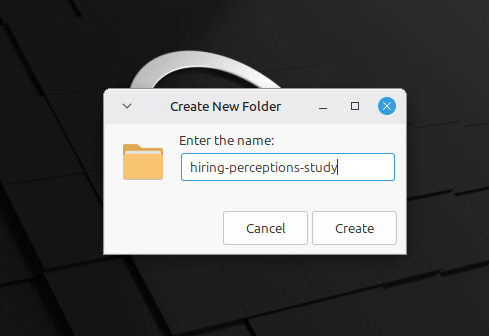
Create a folder for your project. In this example, it’s a folder called hiring-perceptions-study on the Desktop:
Step 4. Start Claude Code
Move into the folder and start Claude Code:
| cd ~/Desktop/hiring-perceptions-study claude |
By default, Claude Code asks for your approval before it runs commands. The first time it pushes to or pulls from GuidedTrack, you can approve the command and tell it not to ask again. When a real password is involved, this is the most predictable option.
If you’d rather not approve commands one by one, start Claude Code in auto mode instead:
| claude –permission-mode auto |
In auto mode, Claude Code runs most commands without asking. A safety check still pauses or blocks anything it judges risky, such as sending credentials somewhere unexpected. That check is a judgment call rather than a fixed rule, so it isn’t a guarantee. Auto mode is available on Pro, Max, and Team plans with a supported model.
Step 5. Install GuidedTrack Skill
In Claude Code, type:
| Install the GuidedTrack Builder skill from https://github.com/GuidedTrack/GuidedTrackAICodingAgentSkill |
Step 6. Save Your Login in a Secret File
This step is so that Claude Code can push the code to your GuidedTrack account, if you don’t need that you can skip this step.
In your project folder, create a text file named secret.txt. Put the new account’s email on the first line and its password on the second:
| you@example.com your-password-here |
Don’t share this folder with anyone. If you use Git, add secret.txt to your .gitignore so the password is never committed.
Step 7. Describe Your Study
Describe what you want in plain English. You don’t need any GuidedTrack syntax. Remember to tell Claude Code where your login is. Here’s the prompt I used:
| Using the guidedtrack-builder skill, build a between-subjects hiring perceptions study called “Hiring Perceptions Study.” Participants see one page with a short resume excerpt for a project management candidate, alongside a headshot photo. Randomly assign each participant to one of four conditions, crossing the candidate’s apparent gender (man, woman) with whether they’re wearing glasses (glasses, no glasses), so every combination shows up equally often. Use GuidedTrack’s placeholder image for all four for now; I’ll swap in real photos later. Save which condition they saw as a single readable variable. After the resume, ask how qualified the candidate seems on a 5-point scale, whether they’d recommend interviewing them, and one open-text question about what stood out to them. When you’re done, push the program to GuidedTrack using the login in secret.txt so I can test it. |
Step 8. Review and Test the Program
When Claude Code finishes, it summarizes what it built and confirms that the program was pushed:
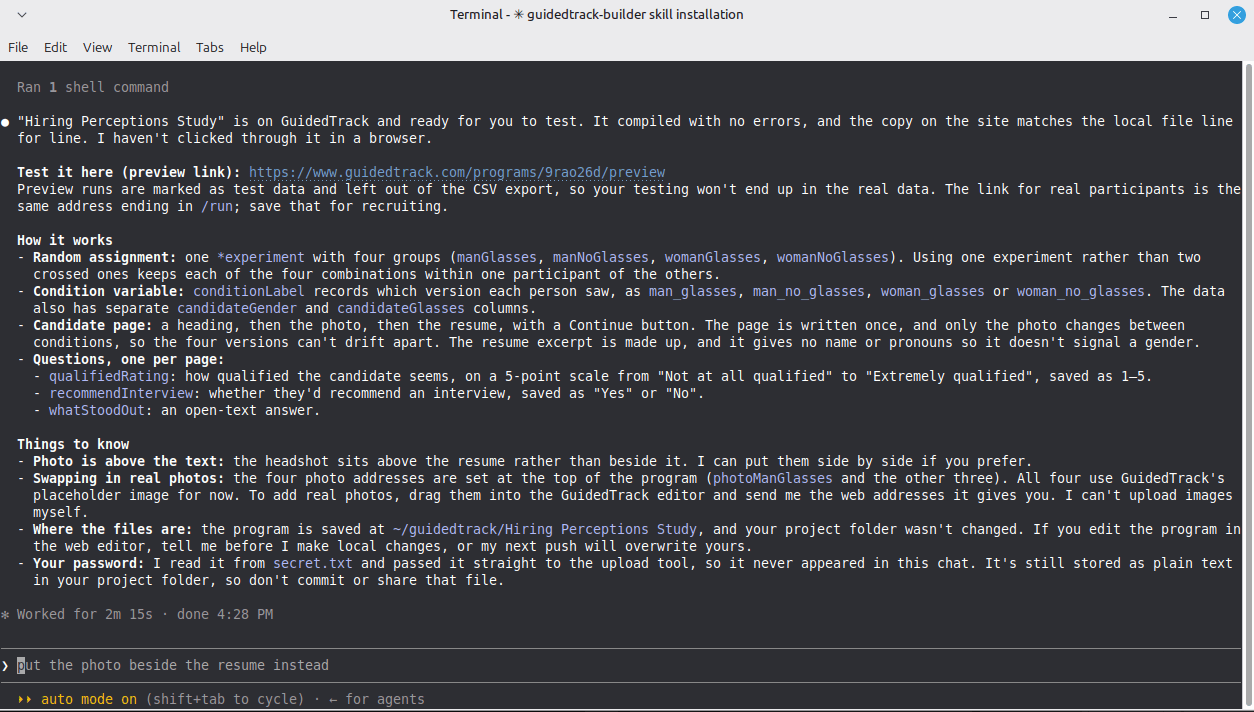
Log in to GuidedTrack with your new account, open the Hiring Perceptions Study, and run a preview. You should see the resume page with the placeholder photo:

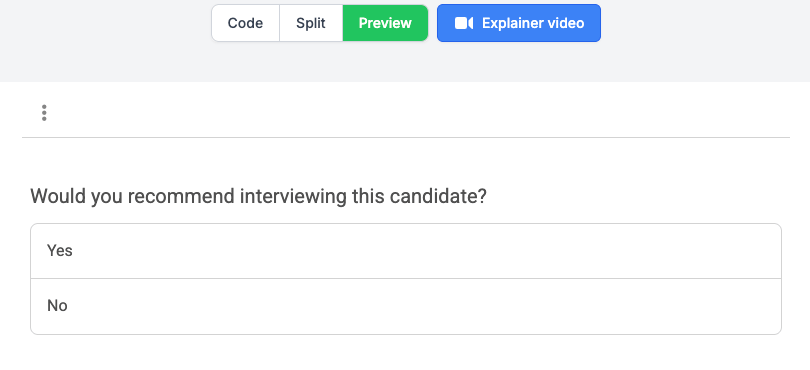
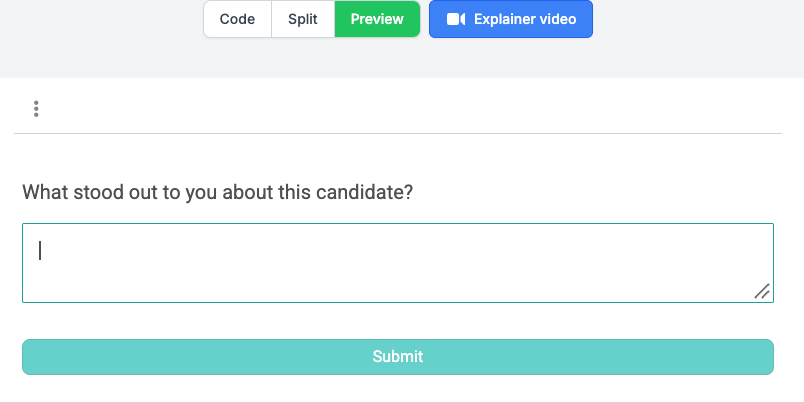
The rating questions come next:

All four conditions use the same placeholder for now, so you can’t tell them apart by looking. While testing, ask Claude Code to temporarily show the condition name on the page. Remove it before launch. To change anything, just tell Claude Code in plain English, for example “make the open-text question optional,” and ask it to push again.
You can also read the GuidedTrack code Claude Code wrote. It’s saved in your GuidedTrack account under the program’s name. View the full program Claude Code built for this example.
Adapting This for Your Use Case
Behind the scenes, Claude Code uses GuidedTrack’s *experiment block to randomly assign each participant to a condition. That block sets the variables the resume page reads. A few ways to build on this:
- Swap in real photos. Use headshots that are matched on age, expression, lighting, and background, so the only differences are gender and glasses.
- Add a comprehension check. Put it before the *experiment block so it can’t differ systematically between conditions.
- Add a manipulation check. Ask something like “What did you notice about the candidate’s photo?” after the rating questions, not before. Asking it earlier could reveal the study’s purpose while participants are still answering.
- Recruit participants. Every GuidedTrack program has a shareable link, so you can send it to participants you recruit through platforms like Positly, or share it by email or on social media.
- Reuse the pattern. The same structure works for many vignette studies: a shared page that reads condition-specific variables set by an *experiment block. You could run an audit study (also called a correspondence study) testing how a candidate’s name affects perceived employability, a design with a long history in labor economics. You could also run similar studies with apartment listings or dating profiles, or switch to a within-subjects design where each participant rates several versions.
- Build an everyday survey instead. You don’t need an experiment to benefit. For a customer feedback survey with skip logic, you could prompt:
| Build a customer feedback survey. Ask how likely people are to recommend us on a 0 to 10 scale. If they answer 6 or lower, ask what we could improve; otherwise, ask what they liked most. |
The same approach works for employee surveys, event feedback forms, course evaluations, and quizzes with scored results.
Frequently Asked Questions
Can AI build a survey for me?
Yes. With the GuidedTrack AI Coding Agent Skill, an AI coding agent like Claude Code or Codex can build a complete survey from a plain-English description, publish it to your GuidedTrack account, and pull the responses back.
Is GuidedTrack free?
Yes, GuidedTrack has a free tier, which is enough to build and run surveys and experiments like the one in this guide. Claude Code itself requires a paid Claude plan.
Can Claude or ChatGPT create a randomized experiment?
Yes, through AI coding agents. Claude Code (from Anthropic) and Codex (from OpenAI) can both build randomized experiments in GuidedTrack, including random assignment to conditions, between-subjects and within-subjects designs, and factorial designs like the 2×2 example above.
How do I build a psychology experiment without coding?
Install Claude Code and the GuidedTrack skill, then describe your experiment in plain English: the conditions, how participants are assigned, and what you want to measure. The agent writes the GuidedTrack program for you, so you never touch the code.
Can I build a survey with branching logic or skip logic using AI?
Yes. Just describe the logic in your prompt, for example “if they answer no, skip to the last page.” GuidedTrack supports branching logic, skip logic, conditional questions, scoring, and randomization.
Do I need to know how to code?
No. You describe what you want in plain English, and the AI agent writes the GuidedTrack code. You’ll only run a couple of setup commands, which this guide gives you word for word.
How do I collect and export the survey data?
Share your program’s link with participants, then ask Claude Code to pull the data. You can analyze your responses in any tool you like, such as Hypothesize.io, R, Python, SPSS, or Excel.

